If you’re trying to book IPPT in Singapore, it sounds simple until you actually log into the NS Portal and start clicking around. Many NSmen get stuck because the system isn’t very intuitive, and most official guides don’t really show you what to do step by step. If you’ve ever opened the portal and thought, “Where do I even start?”, you’re definitely not the only one.
I’ve gone through this myself, and the confusion is real—especially when you’re trying to find available slots or figure out deadlines. This guide breaks everything down clearly so you can book your IPPT quickly without missing anything important or running into last-minute issues.
TL;DR – How to Book IPPT Quickly
Here’s exactly how to book IPPT on NS Portal in 4 simple steps:
- Log in to the NS Portal using Singpass
- Go to “Manage IPPT / NS FIT” under e-Services
- Choose your preferred location, date, and time slot
- Confirm your booking and check for confirmation
Not sure which centre to pick? Compare the best IPPT venues in Singapore to see how CMPB, Kranji, Bedok and Khatib differ on MRT access, parking and track conditions.
Important tips:
- Book as early as possible (up to 3 months ahead)
- Check daily if no slots are available
- Use weekdays for better availability
Checklist
- Login → NS Portal
- Go to → Manage IPPT / NS FIT
- Select → Location + Date
- Confirm → Booking
What Is IPPT and Who Needs to Book It?
The Individual Physical Proficiency Test (IPPT) is a mandatory fitness test for Singaporean NSmen. If you’re currently in the NS cycle, you’ll usually need to complete it every year unless you’re exempted or assigned to NS FIT.
If you’re unsure whether you need to take it, start with the IPPT eligibility guide. If you want a simpler background explanation first, Read IPPT Meaning in Singapore guide.
IPPT Booking Requirements and Eligibility
Before you try booking, make sure:
- You are eligible for IPPT in the current window
- You don’t already have an existing booking
- You are not under medical excuse
- Your IPPT window is open
A lot of users don’t see the booking option simply because their window hasn’t started yet.
To understand how your yearly IPPT window works and when you are allowed to book, review the IPPT window annual requirements. If you want to see exactly where those dates appear in OneNS, follow this guide on how to check your IPPT window dates.
Requirement
| Requirement | Details |
|---|---|
| Eligibility | Must be within IPPT window |
| Existing Booking | Only one active booking allowed |
| Medical Status | Must be fit for IPPT |
| Booking Window | You can typically book your IPPT up to 3 months in advance, depending on available slots. |
IPPT Booking Window and Deadlines
You can typically book your IPPT up to 3 months in advance, depending on available slots. This is important because:
- Good slots get taken quickly
- Waiting too long limits your options
- Last-minute booking often means no availability
In my case, slots were already limited just 2 weeks into the booking window, especially for weekend timings. I also had to refresh multiple times before seeing new slots appear, so it’s normal if you don’t find availability right away.
If you’re unsure how long your booking period lasts or how retakes work inside the same cycle, review the IPPT window annual requirements and then read how many times you can take IPPT in one window.
Step-by-Step: How to Book IPPT on NS Portal
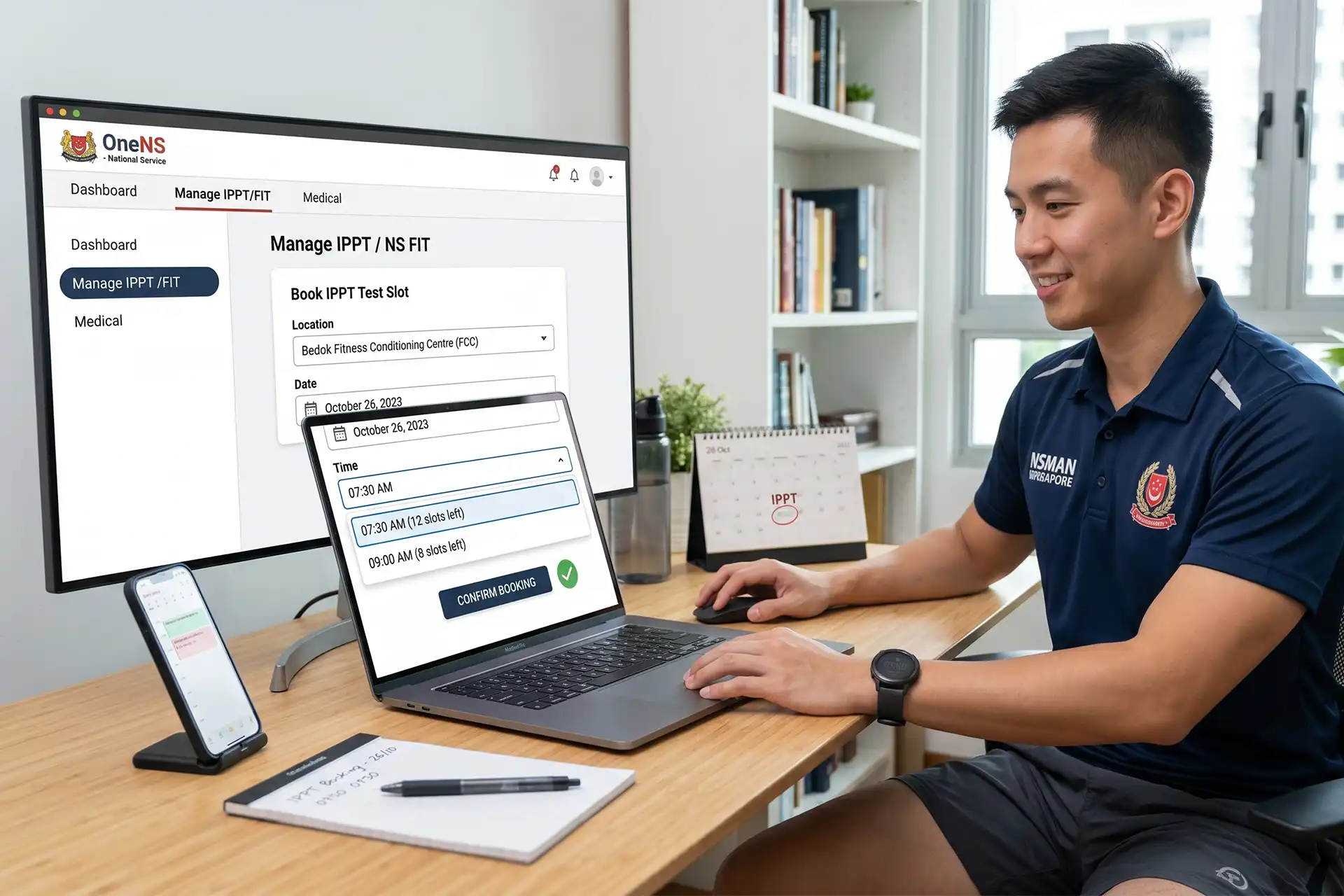
According to NS Portal guidelines, booking is done through the “Manage IPPT / NS FIT” section, which is where you’ll handle everything from selecting slots to confirming your test. This IPPT booking on NS Portal process is straightforward once you know where to click, but most people get stuck the first time.
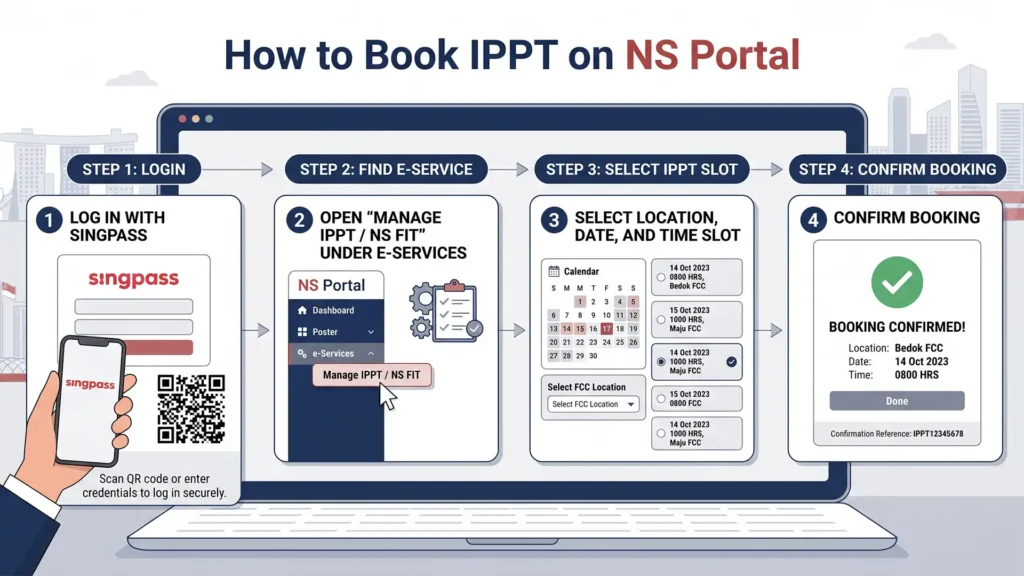
Step 1: Log in to NS Portal (OneNS)
Go to the NS Portal and log in using Singpass. Once inside, you’ll land on your dashboard.
Look for the e-Services section—many users run into this issue the first time.
Step 2: Go to “Manage IPPT / NS FIT”
Inside e-Services, click:
Manage IPPT / NS FIT
This is where you manage everything:
- Booking
- Viewing sessions
- Rescheduling
If you’re not sure when NS FIT applies instead of a normal IPPT booking, read this guide on NS FIT sessions in Singapore.
Step 3: Select IPPT Location and Date
Choose:
- Your preferred IPPT center
- Available date and time slot
If slots are limited, try:
- Different locations
- Weekdays instead of weekends
Step 4: Confirm Your Booking
Review your details and confirm your booking.
Once done:
- You’ll see a confirmation screen
- Your booking will be recorded in the system
Login → Manage IPPT → Select Slot → Confirm
What Happens After Booking IPPT?
Once your booking is confirmed, make a note of:
- Your confirmation details
- What to bring
- Your reporting time
Keeping a screenshot of the confirmation can help if you need to reschedule later.
How to Change or Cancel Your IPPT Booking?
To modify your booking:
Go to:
Manage IPPT / NS FIT → View Booking
From there, you can:
- Reschedule
- Cancel
Make sure to do this before the cut-off time to avoid issues.
Common IPPT Booking Problems (And How to Fix Them)
This is where most people struggle—and where most guides don’t help.
“I can’t find the booking option”
Possible reasons:
- Your IPPT window hasn’t opened
- You’re not eligible
- You already have a booking
Solution: Check the IPPT eligibility guide first, then confirm your dates with this guide on how to check your IPPT window dates.
“No slots available”
This is very common, especially near deadlines.
Try:
- Checking early morning
- Switching locations
- Booking earlier in your window
“Booking button is greyed out”
Usually caused by:
- Medical status
- Existing booking
- System restrictions
Check your status or clear existing bookings.
| Problem | Cause | Solution |
|---|---|---|
| No slots available | High demand | Check daily / switch location |
| Booking option missing | Window not open | Check eligibility |
| Button greyed out | Existing booking | Cancel or check status |
No IPPT Slots Available? What You Should Do?
If you really can’t find any slots:
- Check daily (slots open up frequently)
- Avoid peak times (evenings/weekends)
- Try less popular locations
If your window is getting close and you’re worried about missing the requirement, read how to recover after failing IPPT so you know the likely next steps before the deadline passes.
Best Time to Book IPPT (Pro Tips)
From experience:
- Book as soon as your window opens
- Don’t wait until the last month
- Weekday slots are easier to get
- Morning checks often show new slots
If you’re preparing for the test as well, use the IPPT score calculator to estimate your current result and follow how to ace your IPPT in 7 easy steps for a simpler training plan.
IPPT Booking for Different Groups
NSmen
- Must book yearly
- Use NS Portal
Pre-Enlistees
- May follow a different process
- Often handled via CMPB
If you’re aiming for a specific score before enlistment, read this guide on pre-enlistee IPPT and why 61 points matters.
Understanding IPPT Scores Before You Book
Before booking, it helps to know what score you should aim for. Start with the IPPT scoring system to understand how the points work, then use the IPPT calculator to estimate your current score. If you need exact station-by-station rows afterward, check the relevant scoring table for your age and category.
Frequently Asked Questions About IPPT Booking
Up to 3 months before your test date.
Yes, as long as it’s before the cut-off.
You may need to attend NS FIT sessions in Singapore or prepare for another attempt, depending on your status and unit instructions.
No, but keep your confirmation.
Final Thoughts
Booking IPPT isn’t difficult once you know exactly where to click, but the system doesn’t make it obvious the first time. If you follow the steps in this guide and book early, you’ll avoid most of the common issues people run into. The biggest mistake people make is waiting too long—once you take action early, everything becomes much easier.